

The Role of Baseline Documentation in Support Operations
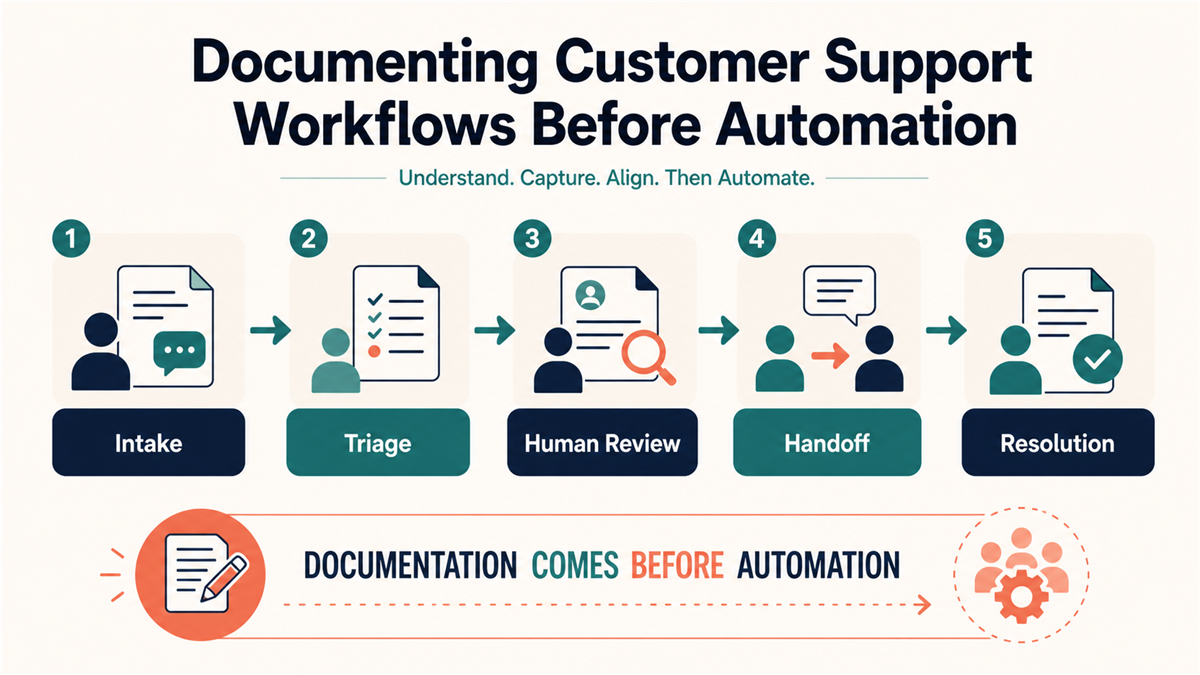
Before introducing new technology into a customer service workflow, an operations team needs a clear record of how its existing process works. This record becomes a shared reference for human agents and for any later system configuration. Without it, a team can automate unclear routing, outdated answers, or inconsistent escalation rules. Start by mapping the customer interaction from the first question through resolution and follow-up. Record the question types the team receives, the resources agents use, the decisions they make, and the conditions that require another person.
Useful documentation also captures the practical knowledge that experienced agents apply but may never have written down. Externalizing that knowledge reduces dependence on memory and makes training and review easier. The mapping exercise can expose duplicate steps, conflicting instructions, and old policies before they are copied into a new workflow. Treat the result as a current-state record, not as proof that the existing process is correct. Each step should have an owner, a purpose, an expected input, a safe output, and a fallback when the process cannot continue.
Audit Existing Processes and Digital Assets
Review internal articles, troubleshooting guides, standard procedures, approved response language, and the access needed to maintain them. The goal is to learn which sources are current, which are duplicated, and who can approve a correction. Assign a reviewer to each knowledge asset and record its last verification date. Archive or label obsolete material so an agent does not mistake it for current guidance. This creates a more reliable source set for training and day-to-day use.
The audit should also show how support connects to the rest of the organization. Clear technology transition records help a team document where customer-facing assets live, who controls them, and where a website or software issue should go. Map the dependencies between support, product, sales, billing, and site operations. Do not give every agent broad access. Record the smallest role needed for each task and the approved handoff when the task sits outside that role.
Standardize Intake and Triage
The beginning of an inquiry determines what information is available later. Define a small issue taxonomy using the questions the team actually receives. Document the minimum fields needed for each category and the conditions that change its priority. A technical issue might require the affected page or feature, the observed error, the time it occurred, the device or browser, and steps that reproduce it. A billing question requires a different set of fields and should follow a separate restricted path.
Structured intake forms and reviewed response templates can make the required steps easier to follow. They should guide an agent without forcing a customer to provide unnecessary information. Explain why a requested field is needed, avoid collecting secrets, and give the agent a safe option when the customer cannot supply a detail. Review templates for benefit-led language, a clear next action, and promises the operating team can actually keep. The objective is a complete, understandable case record, not a longer form.
Map the Human Handoff
A handoff needs more detail than “send this to the next team.” Document the trigger, the receiving role, the information that travels with the case, and the message shown to the customer. The receiving person should be able to understand what has already happened without asking the customer to repeat every step. A useful handoff note includes the customer’s stated goal, the category selected, the checks already completed, the observed result, and the exact unresolved question.
Record what happens when the preferred receiving person is unavailable. The workflow may offer another trained role, a customer-safe follow-up option, or an honest notice that review will happen later. Do not promise a response time unless the team has approved and tested that commitment. If a case arrives without the required context, send it back through a documented correction step instead of allowing it to disappear between teams. Review handoff failures as process evidence rather than blaming the person who reported them.
Assign Ownership with a Decision Table
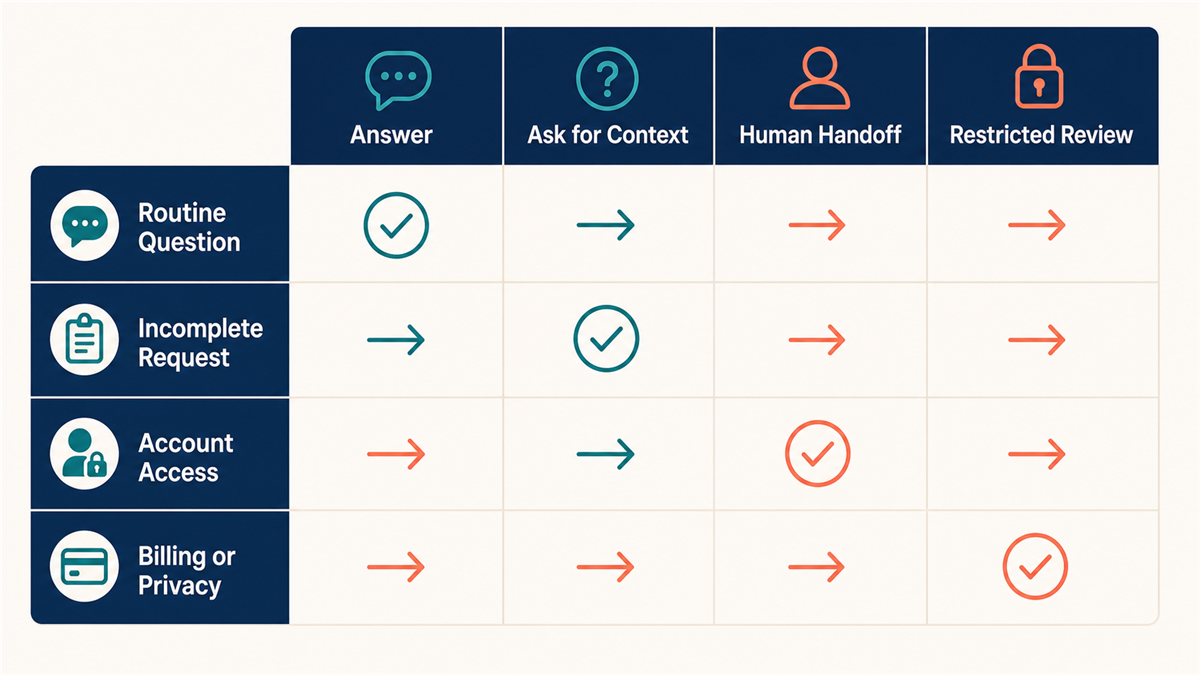
A compact decision table can turn a long process description into a usable operating reference. For each question type, list the role that may answer it, the source that supports the answer, the condition that requires a handoff, and the role that receives it. Add a separate column for actions that must never be taken without a designated owner. This makes the boundary visible when an agent is deciding whether to answer, request more context, or stop and escalate.
Test the table with realistic examples before treating it as current guidance. Include an ordinary information request, an incomplete request, a request involving another department, and a sensitive request that must follow a restricted path. Two reviewers should reach the same routing decision from the written rule. If they do not, revise the wording or split an overly broad category. Record the tested examples with the table so a future reviewer can see what each rule was intended to cover.
Ownership also needs a continuity plan. Name a backup role for each essential decision, document how that person receives the relevant context, and define what happens when neither role is available. The fallback may be a safe holding response and later human review; it should not silently widen access or let an unreviewed answer move forward. Recheck the decision table when responsibilities, products, or policies change.
Define Objective Escalation Triggers
Terms such as “complex,” “urgent,” or “high value” are too vague to guide a consistent decision. Replace them with observable conditions. Examples include an account-access request, a billing dispute, a security concern, a privacy or deletion request, a repeated failed troubleshooting step, or a request to change customer data. Each trigger should name the authorized receiving role and the information that may be shared. Sensitive cases should take a restricted path and should never be routed through a general sales or marketing workflow.
Review escalation data on a schedule. If one question is repeatedly transferred, decide whether the initial category, training material, or owner assignment should change. If a specialist repeatedly receives cases that the first team can safely resolve, update the documented boundary and training only after the responsible owner approves it. The purpose of the review is to improve the decision path while preserving privacy, access, and human-review controls.
Separate Support from Lead Qualification
Some pre-sales questions arrive through a support channel, but that does not make every customer conversation a sales lead. Define which questions can be answered as general product-fit guidance and which require a voluntary sales handoff. A source-specific Facebook Page automatic reply troubleshooting checklist also shows why teams should verify the existing message path before changing response behavior.
Require a clear fit signal before changing the purpose of the conversation. Tell the person what will happen next and request only the information needed for that step. Do not pass account, billing, security, or private support details into a sales workflow. Document how the support agent introduces the optional handoff and how the receiving team confirms it. This keeps the customer’s original goal visible while giving interested prospects a clear next action.
Prepare the Workflow for Carefully Bounded Automation
Once the human path is documented and reviewed, the team can identify narrow steps that may be suitable for automation. The current-state map helps when it is time to prepare your team for an AI customer service chatbot. It shows the approved source material, supported question types, escalation triggers, and fallback responsibilities that should be tested before a public workflow is considered.
Start with one repetitive, low-risk use case and keep a person responsible for the result. Define what the automated step may answer, what it must refuse, and when it must transfer the conversation. Test incorrect, incomplete, sensitive, and out-of-scope questions as well as the expected path. Compare the observed behavior with the documented rules. If the behavior does not match, keep the workflow disabled while the source material, routing, or configuration is corrected.
Build a Review and Change-Control Cycle
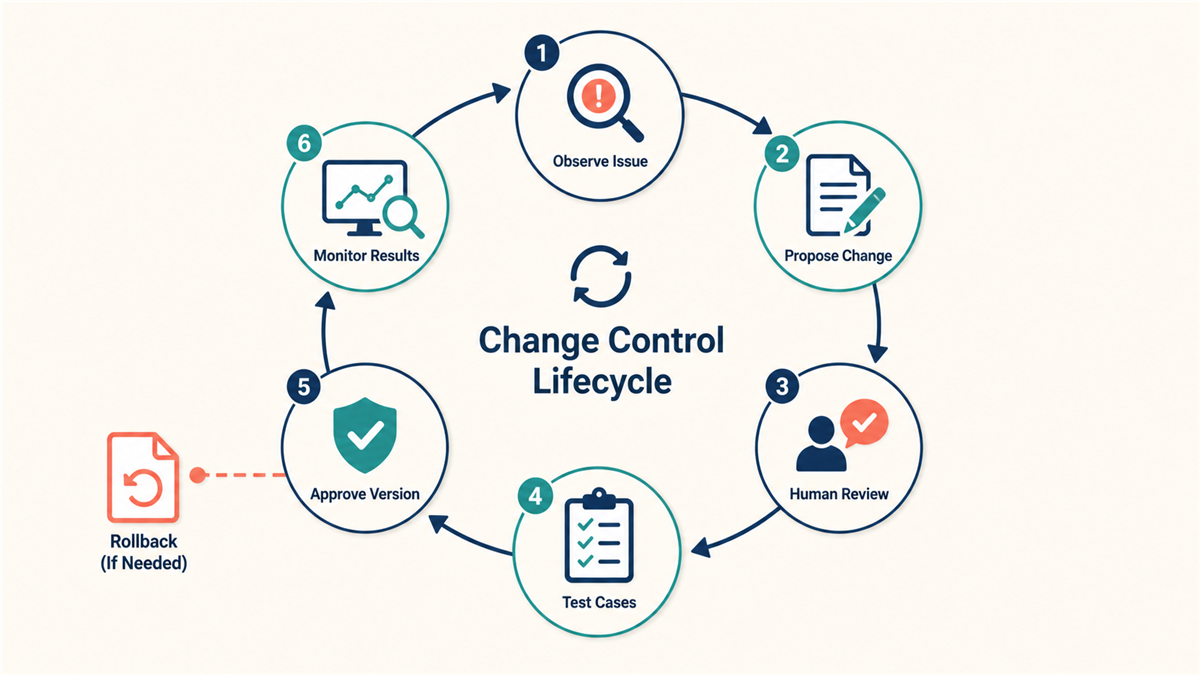
Support documentation changes as products, policies, and customer questions change. Assign a review interval based on risk: sensitive account, billing, security, and privacy paths generally need closer owner attention than a low-risk informational answer. Record the person who approved each change, the date, the reason, and the rollback reference. When a source article changes, note which response templates, routing rules, or tests depend on it.
Frontline agents should have a simple way to report a missing step or a confusing instruction without changing the approved process themselves. Review those reports alongside unanswered questions, incorrect transfers, repeat contacts, and customer feedback. A proposed change should be tested against representative cases before it replaces the current instruction. Keep the previous version available for rollback until the new path has passed its acceptance checks.
A Practical Documentation Checklist
- List the customer goals and question types the team actually handles.
- Name the approved knowledge source and owner for each supported answer.
- Define the minimum information required for each intake category.
- Write observable escalation triggers and restricted sensitive-case paths.
- Specify the receiving role, handoff note, fallback, and customer message.
- Separate optional lead qualification from private support work.
- Choose one bounded automation candidate and document its refusal boundary.
- Test expected, incorrect, sensitive, incomplete, and out-of-scope inputs.
- Record approval, version, review date, and rollback reference for each change.
- Keep human review responsible for unresolved or higher-risk outcomes.
The finished map should make the next decision easier: improve the human process, repair the source material, or test one bounded automated step. It should not be used as evidence that a tool is accurate, compliant, or ready for every customer. Those conclusions require separate product, configuration, privacy, security, accessibility, and operational testing. Documentation provides the reviewable foundation for that work.
Frequently Asked Questions
What should a customer support workflow document include?
Include the customer goal, intake requirements, approved answer source, decision owner, escalation trigger, receiving role, handoff context, fallback, review date, and rollback reference. The document should make the next safe action clear without giving a role broader access than it needs.
When should a support question move to human review?
Use human review when the request is unsupported, incomplete after a reasonable clarification step, sensitive, outside the current role, or asks for an account, billing, security, privacy, or data change. Write observable triggers so two reviewers can reach the same routing decision.
How should a team test a documented handoff?
Run representative routine, incomplete, cross-team, and sensitive cases through the written rule. Confirm that the receiving role gets the approved context, the customer receives an accurate next-step message, and no restricted information crosses into an unrelated workflow.
Does workflow documentation prove automation is ready?
No. Documentation creates a reviewable baseline. Any automated step still needs separate testing for supported questions, refusal behavior, escalation, privacy, security, accessibility, monitoring, and rollback before a team considers wider use.